
Introduction to Amass
The first tool I have started to explore in Kali Purple is Amass. Amass is a tool, designed for mapping attack surfaces and other external assets. In the world of cybersecurity, reconnaissance is a crucial step in understanding the landscape of a network and identifying potential vulnerabilities. Amass is an open-source tool included in Kali Linux Purple. In this post, we’ll explore the basics of using Amass.
What is Amass?
Amass is an open-source tool that is designed for in-depth DNS enumeration and network mapping, Amass helps gather vital information about domain names, subdomains, and IP addresses. This is crucial for understanding the structure and potential weak points of a network, which is essential for any cybersecurity professional.
Key Features of Amass:
- DNS Enumeration: Amass can quickly discover subdomains and other DNS records linked to a target domain, providing a detailed map of an organization’s online presence.
- Network Mapping: It helps create a visual representation of a network’s layout, which is vital for security assessments and penetration testing.
- Automation: The tool automates the process of data collection and analysis, saving time.
- Data Correlation: Amass combines data from multiple sources to provide a more accurate and detailed view of the target’s infrastructure.
Applications in Cybersecurity:
- Vulnerability Assessment: By identifying all assets associated with a domain, security professionals can better assess potential vulnerabilities and prioritize their mitigation efforts.
- Penetration Testing: Amass is commonly used during the reconnaissance phase of penetration testing to gather information that can be used to identify and exploit weaknesses.
- Threat Hunting: The tool aids in proactive threat hunting by providing insights into the attack surface that needs to be monitored for suspicious activities.
Basic Amass Commands
Scan the site and Discover
One of the primary uses of Amass is discovering subdomains and IP’s associated with a target domain. Under the “001 – Identify” sub is the Amass tool. Commands can take some time as it runs, be patient, it could take several minutes. Here’s how to get started:
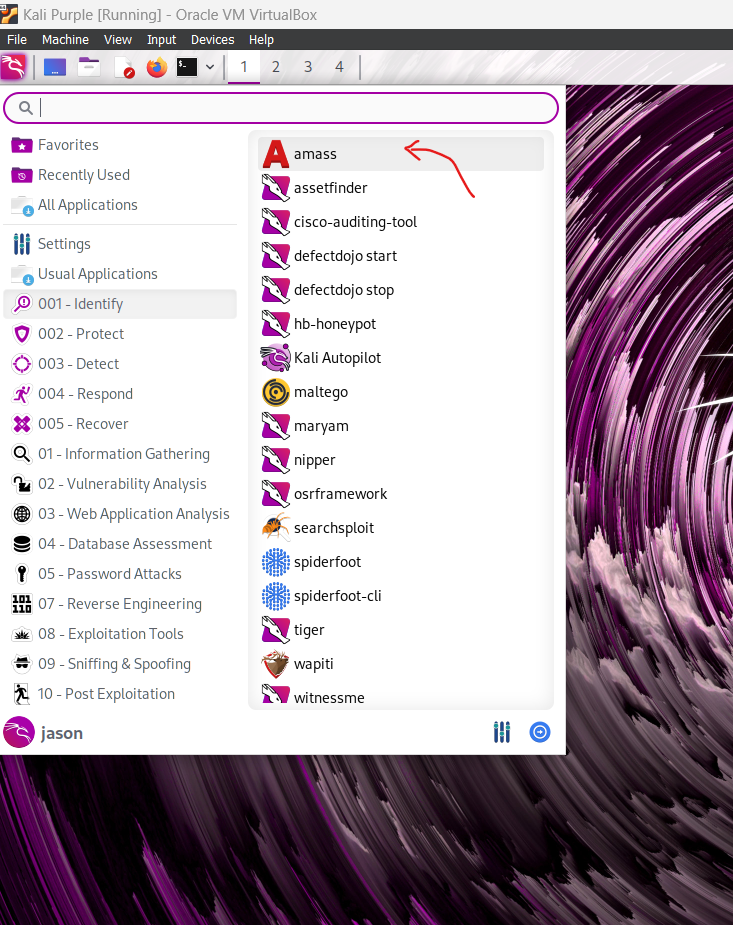
Run the Enumeration Command: amass enum -d example.com
This command will enumerate subdomains example.com and display the results. After running the command, here is what was found after running on example.com
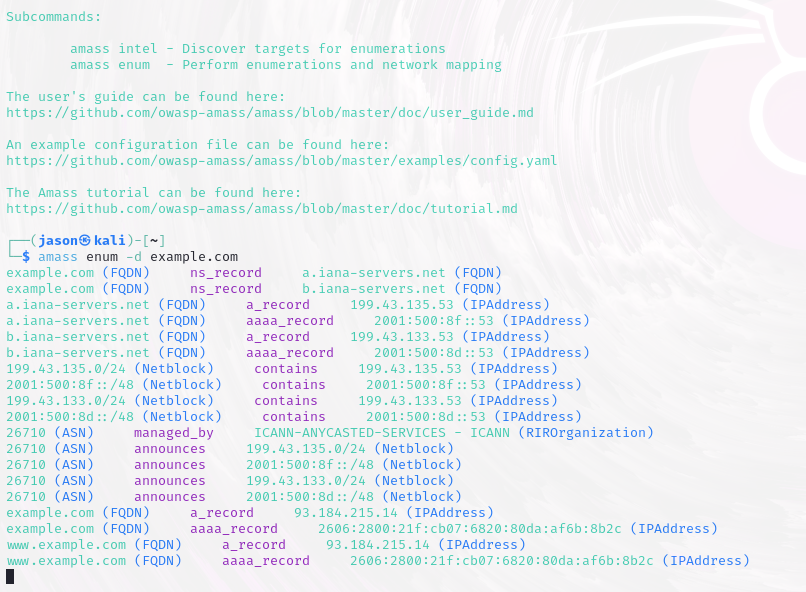
These findings are from example.com. The Amass scan revealed DNS and network info for example.com, including its IP, name servers, and the autonomous system responsible for managing these resources.
Advanced Usage: Network Mapping
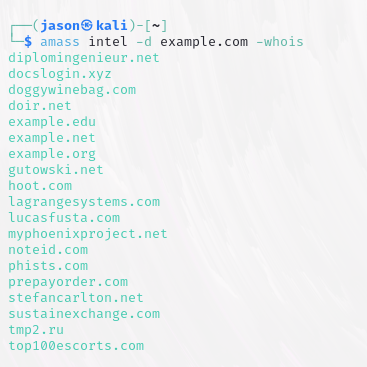
Amass can also map the network to show relationships between different assets. Use the following command to perform a more in-depth analysis: amass intel -d example.com -whois
This command will gather intelligence on the target domain, providing more detailed information about its network.
Conclusion
As I dive into the world of cybersecurity, Amass has been a great discovery. It’s available through Kali Linux Purple and is perfect for its ability to uncover network details like subdomains and IP addresses. Learning its basic commands for DNS enumeration and advanced features for network mapping has equipped me with essential tools for vulnerability assessment and penetration testing. As I continue to explore more Blue team tools and document my findings rigorously, I’m confident that Amass will significantly assist my cybersecurity expertise.
Tips and Best Practices
Here are some tips to use Amass efficiently:
- Automate Tasks: Use scripts to automate repetitive tasks.
- Stay Ethical: Always have permission to test the target domain to avoid legal issues.
- Document Findings: Keep detailed notes or screenshots of your reconnaissance for future reference.